
SellerPic vs Seelab: Which AI Tool Creates Better Product Photos for Your Online Store?
You know how crucial high-quality product images are for your online store. They attract attention, build trust, and directly increase sales. Many store owners struggle with the time and cost of traditional photoshoots or hiring models. Two AI-powered tools, SellerPic and Seelab, promise to solve this problem by transforming or generating professional visuals quickly.
Quick Verdict
SellerPic is the stronger choice if you already have product photos (especially clothing) and want to quickly turn them into model-worn lifestyle images and videos. Seelab works best when you need to generate fresh, on-brand visuals from scratch or descriptions to keep your entire store and marketing consistent. Both tools can save significant time and money compared to traditional photography.
Key Takeaways
- SellerPic excels at transforming your existing flat-lay or basic product photos into dynamic, model-worn lifestyle scenes and short videos.
- Seelab focuses on generating new images that match your brand style through custom AI model training and easy refinement tools.
- Both tools help small businesses and e-commerce sellers create professional visuals without expensive photoshoots or design experience.
- Choose SellerPic when speed and transformation of current assets matter most. Choose Seelab when brand consistency across many images is your top priority.
- Input photo quality strongly affects results for both tools. Clear, well-lit originals produce the best output.
What’s in This Article
SellerPic vs Seelab at a Glance
Both tools use AI to improve product visuals, but they solve slightly different problems. SellerPic focuses on transforming photos you already have. Seelab emphasizes creating new images that stay true to your brand.
SellerPic: AI Photo Transformation Tool
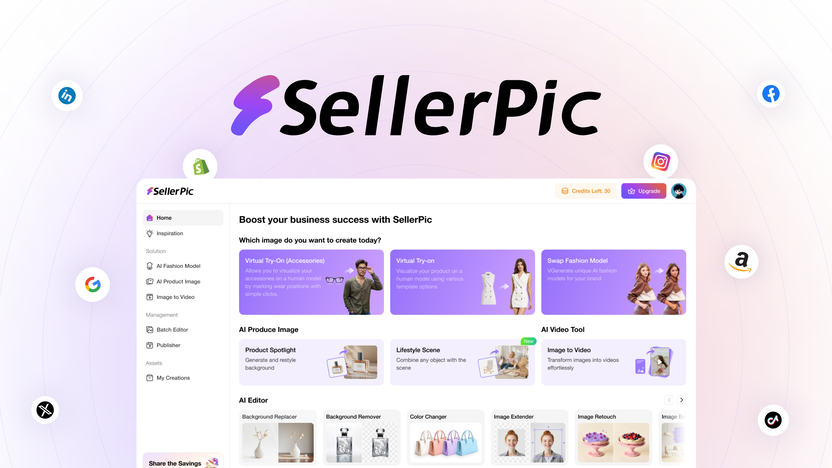
If you want to upgrade your existing product photos without new shoots or models, SellerPic offers a practical solution. It uses AI to convert basic shots, such as flat-lay clothing images, into visuals that show products on models or in realistic settings. You can also generate short videos from your images.
This approach works especially well for apparel and lifestyle products. Many users report saving hours per week while achieving a more professional look on their product pages.
Pro tip: Upload clear, well-lit original photos for the best AI transformations. Blurry or poorly lit images limit how realistic the final results look.
Pros and Cons
| Pros | Cons |
|---|---|
| ✓ Fast AI-powered transformations | ✗ Limited customization options for backgrounds |
| ✓ Creates both images and videos | ✗ Best results with clear, high-quality original photos |
| ✓ User-friendly interface | |
| ✓ Great for clothing and lifestyle products |
What People Say
Users appreciate how SellerPic turns basic photos into eye-catching visuals that feel professional without needing a big budget or complicated software. Many highlight the time saved and the boost in customer interest after using it.
- I was amazed at how quickly SellerPic transformed my flat-lay clothing photos into images that looked like they were worn by models. It saved me so much time and gave my product pages a fresh, professional look that definitely boosted engagement.– ClaraM
- SellerPic’s AI-generated lifestyle scenes helped me showcase my products in a way that felt authentic and appealing. The videos it creates are smooth and really add value to my listings, making them stand out from the competition.– Jason_Tech
Value and Return on Investment
By replacing expensive photo shoots and model hires, SellerPic helps you keep your marketing budget under control while still producing high-quality visuals that attract buyers. The improvement in presentation can lead to higher conversion rates, which often helps the tool pay for itself through increased sales.
Ease of Use
| Aspect | Ease Level | Notes |
|---|---|---|
| Interface | Easy | Clean and intuitive, no steep learning curve |
| Photo Uploading | Easy | Drag and drop makes adding images quick |
| Editing Options | Moderate | Basic customization available but mostly automated |
| Video Creation | Easy | One-click video generation from images |
Speed and Performance
Transforms photos and generates videos in seconds. The AI processing stays smooth and reliable even when you work with multiple images at once.
Integration With Other Tools
| Software | Integration Quality |
|---|---|
| Shopify | Seamless import/export of images |
| WooCommerce | Easy to upload enhanced photos directly |
| Social Media Platforms | Quick sharing options for marketing |
Reliability and Learning Curve
SellerPic consistently delivers high-quality transformations without crashes. The straightforward interface and helpful prompts mean you can start improving photos right away with minimal learning time. Collaboration features also let you share projects easily with team members.
Why You’ll Like SellerPic
- Transforms simple product photos into model-worn images instantly
- Creates lifestyle scenes and videos to boost product appeal
- Saves time and money compared to traditional photo shoots
- Easy to use even if you’re not a design pro
Current Price: $69
Rating: 4.6
Seelab: AI Brand-Consistent Image Generator

If you want to create high-quality images that match your brand style without constant manual editing, Seelab provides a focused solution. It uses AI to generate and refine images so your visuals stay polished and consistent, whether you update product listings or prepare campaign photos.
You do not need advanced design skills to get good results. Many small business owners use it to keep their entire visual identity coherent across the store and marketing channels.
Note: Seelab performs best when you train it on your brand assets first. Spending a little time on custom model training leads to much more consistent output across all your images.
Pros and Cons
| Pros | Cons |
|---|---|
| ✓ AI-powered image generation with brand focus | ✗ Limited advanced customization options |
| ✓ Simple tools for refining images | ✗ Best results require clear input images |
| ✓ Good value for the price | |
| ✓ No steep learning curve |
What People Say
People appreciate how Seelab helps them get professional-looking images without the usual hassle. Many mention how it fits well for small businesses that want to keep visuals fresh and on-brand without spending a fortune.
- Seelab’s AI really helped me create images that fit my brand style perfectly. I was able to tweak details easily, and the quality was impressive for the price. It made updating my product photos much less stressful.– Emma_Retail
- I liked how Seelab lets you generate fresh images quickly and refine them without complicated tools. It’s great for someone like me who wants good visuals but doesn’t have a lot of design experience.– Mark_ShopOwner
Value and Return on Investment
Seelab helps you avoid costly photo shoots and expensive editing software. By improving your product visuals with minimal effort, it can increase customer interest and support higher sales, making the investment worthwhile for many stores.
Ease of Use
| Aspect | Ease Level | Notes |
|---|---|---|
| Interface | Easy | Clean layout that’s simple to navigate |
| Image Generation | Easy | Quick AI creation with minimal input needed |
| Refinement Tools | Moderate | Basic editing options that are straightforward |
| Exporting | Easy | Simple download and sharing options |
Speed and Performance
Seelab generates and refines images quickly. It handles multiple images smoothly, making it practical for daily use. External comparisons also note its responsive performance.
Integration With Other Tools
| Software | Integration Quality |
|---|---|
| Shopify | Easy image export for product listings |
| WooCommerce | Supports quick upload of enhanced photos |
| Social Media Platforms | Direct sharing options for marketing posts |
Reliability and Learning Curve
Seelab runs smoothly with consistent output quality. The manageable learning curve and clear instructions help you get started without frustration. Team sharing features also support collaboration on visual content.
Why You’ll Like Seelab
- Generates high-quality images tailored to your brand
- Easy refinement tools for quick adjustments
- Saves time compared to manual photo editing
- User-friendly even if you’re new to design
Current Price: $79
Rating: 4.2
How to Choose the Right Tool for Your Store
Your choice depends mainly on the type of images you need and how you currently create them.
Choose SellerPic if:
- You already have product photos and want to transform them quickly into model-worn or lifestyle scenes
- You sell clothing, accessories, or other items that benefit from realistic model placement
- You also want short product videos without extra work
- Speed and ease of turning existing assets into professional visuals is your priority
Choose Seelab if:
- You need to create many new images that must match a consistent brand style
- You want to train an AI model on your specific products and aesthetic
- Brand consistency across product pages, ads, and social media matters most
- You prefer generating fresh visuals rather than editing existing ones
Many stores use both tools for different needs. Start with the one that solves your biggest current pain point.
Frequently Asked Questions
How Do SellerPic and Seelab Differ When It Comes To Enhancing E-commerce Photos?
SellerPic focuses on transforming your static product photos into dynamic visuals. It uses AI to create model-worn images and lifestyle scenes that can boost sales appeal. Seelab emphasizes generating brand-consistent images from scratch or descriptions and refining them to match your style. If you want to quickly enhance existing photos, SellerPic is usually the faster option. If you need fresh images that stay true to your brand identity, Seelab often works better.
Is It Worth Paying $69 For SellerPic Or $79 For Seelab If I’m Just Starting My Online Store?
Both tools target small businesses and offer strong value at their AppSumo lifetime deal prices. SellerPic at $69 gives you immediate upgrades to existing photos without photoshoots. Seelab at $79 suits stores that want to build a consistent visual identity from the start. Consider your current workflow: quick transformation of what you already have, or generating new on-brand images regularly.
What Are Some Practical Tips For Getting The Best Results Using These Tools?
With SellerPic, start with clear, well-lit original photos. Experiment with different model and scene options to see what resonates with your audience. For Seelab, take time to train the AI on your brand assets first. Preview how the new images look on your actual product pages before publishing. In both cases, high-quality input leads to much better output.
Final Thoughts
SellerPic and Seelab both use AI to help e-commerce sellers create better product visuals without traditional photoshoots. SellerPic stands out when you need to transform existing photos into engaging lifestyle content. Seelab performs well when you want to generate consistent, on-brand images from the ground up.
Start with the tool that matches your biggest need right now. Test it on a few products, compare the results to your current images, and decide whether it improves conversions enough to justify the investment. Either option can meaningfully upgrade how your products appear to customers.
| SellerPic | Seelab | |
|---|---|---|
|
|
|
|
| Rating | 4.6/5 | 4.2/5 |
| Highlights | Transform static product photos into dynamic, sales-boosting visuals using AI. | Use AI image generation to create and refine high-quality images that match your brand. |
| Pros | Quickly converts lay-flat clothing images into model-worn photos. | Great for generating unique images tailored to branding. |
| Cons | Limited to specific types of products for best results. | Less effective for transforming existing photos. |
| Price | $69.00 | $79.00 |
| Buy Now | Buy Now |