PageTest.AI AppSumo Review: No-Code A/B Testing Tool

Hi, I’m Jay with AppSumo. If you want to stop guessing which copy converts and start making data-backed decisions, PageTest.AI can help. Read on to learn what PageTest.AI does, how it works, and who should use it. We also cover the features that make testing fast, private, and simple.
Quick Answer
- What is it? A no-code A/B testing tool that optimizes webpage headlines, calls to action (CTAs), and subheadings.
- How does it work? Highlight text on your live site, create variants manually or with AI, and deploy them using Google Tag Manager.
- Who is it for? Marketers, founders, and agencies who want to increase conversions without writing code.
Table of Contents
- Why PageTest.AI matters 🤖
- How it works ⚙️
- AI-generated variants ✍️
- No-code workflow 🚀
- Results & dashboard 📊
- Privacy & collaboration 🔒
- Who should use PageTest.AI? 🎯
- How to get started ✅
- FAQ ❓
- Final thoughts & next steps 🏁
Why PageTest.AI matters 🤖
Optimization often feels like a guessing game when you do not know which content actually converts. PageTest.AI removes this guesswork. You can test headlines, CTAs, and subheadings without touching any code. Just point, click, and launch your tests in seconds.
How it works ⚙️
PageTest.AI uses a simple no-code workflow to launch tests in minutes:
- Enter the page URL you want to test.
- Select the content you want to experiment with by highlighting it on your live page. This can be a headline, a CTA, or a subheading.
- Add variants manually or use AI-generated suggestions. You can also include an optional control, which is the original copy.
- Start the test to generate a small code snippet. You then add this snippet to Google Tag Manager.
- Monitor results in real time from your dashboard.
AI-generated variants ✍️
PageTest.AI analyzes your live page automatically. It then generates variations for your headlines, CTAs, and subheadings. You receive alternative test copy in seconds, allowing you to focus on overall strategy instead of writing every option yourself.
No-code workflow 🚀
You do not need to be a developer to run meaningful A/B tests. With PageTest.AI, you simply select the text on your page, apply your variants, and go live. The platform creates a snippet that you paste into Google Tag Manager to run the experiment.
Results & dashboard 📊
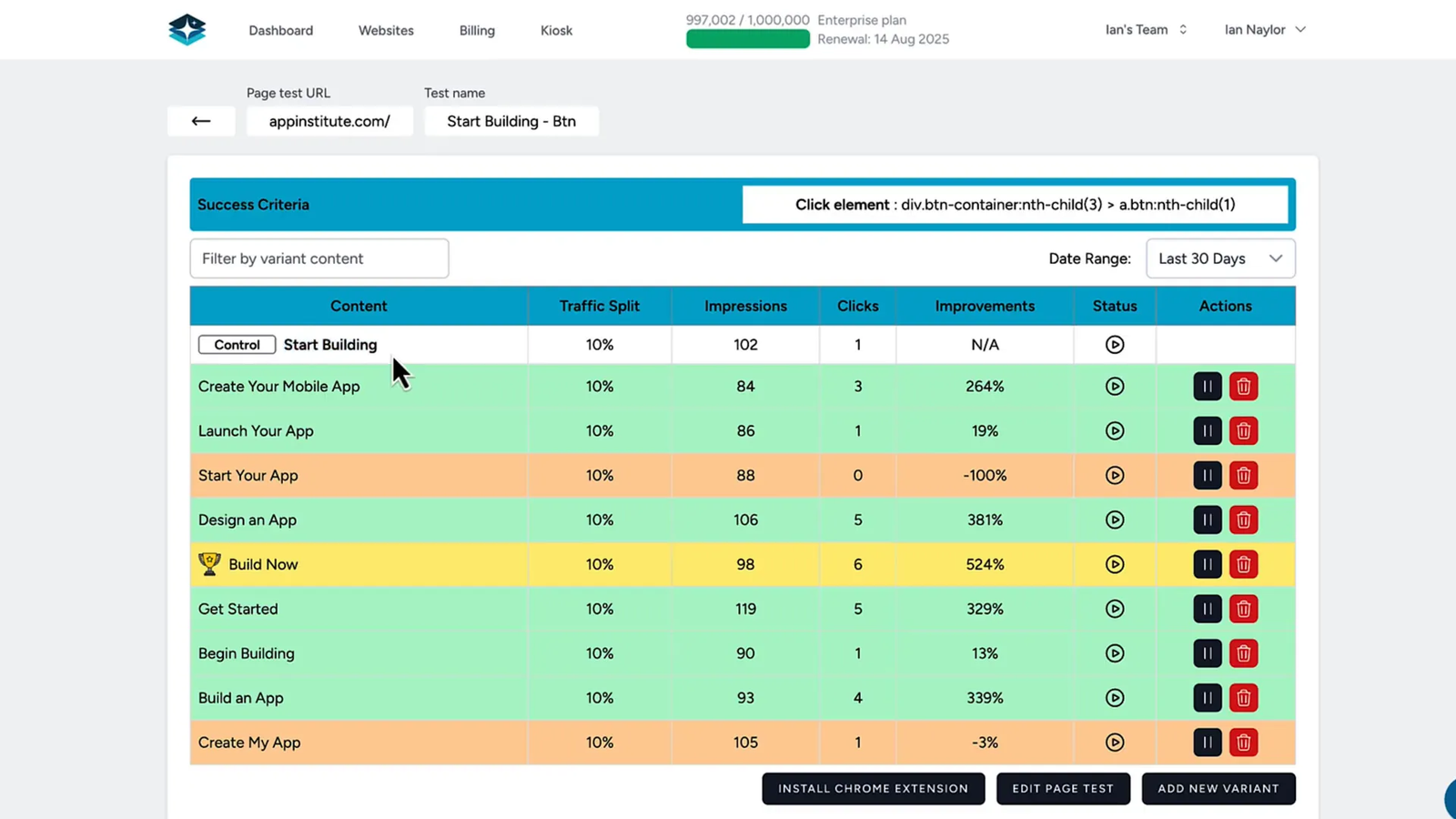
After a test goes live, PageTest.AI collects the data and displays real-time performance in your dashboard. You can see how many visitors saw each variant, review click-through rates, and identify the winning options. These metrics help you scale the copy that performs best.
Privacy & collaboration 🔒
All tests remain 100% private. There are no public leaderboards and no competitor access. If you run experiments for clients, you can add them as users without exposing your other test data. This privacy-first setup works perfectly for agencies and consultants handling sensitive campaigns.
Who should use PageTest.AI? 🎯
This flexible tool supports a wide range of teams and creators:
- SaaS startups: Test homepage messaging to boost signups and conversions.
- Content managers and bloggers: Test article headlines against scroll depth to increase engagement.
- Agencies: Run A/B tests for clients without using developer time.
- Course creators: Improve landing page CTAs to grow course enrollments.
- Ecommerce brands: Experiment with product headlines and CTAs to increase sales.
How to get started ✅
Getting a test running is straightforward. Follow this quick checklist:
- Enter the URL of the page you want to test.
- Highlight the text element you want to change and click “test this variant”.
- Add additional variants or let the AI write them for you.
- Optionally add a control to measure against the original copy.
- Click “start test” to generate your code snippet. Paste it into Google Tag Manager.
- Watch the dashboard for visitor counts, click-through rates, and winning variants.
FAQ ❓
Is coding required to run tests?
No. PageTest.AI is a strict no-code solution. You select page elements, add variants, and deploy them using a Google Tag Manager snippet.
How does the AI decide on variants?
The AI analyzes your live page content and suggests strong alternatives for your headlines, CTAs, and subheadings. You can use these as starting points to begin testing right away.
Are test results public?
No. Results stay private and do not appear on a public leaderboard. You control user access and can safely invite clients to view their specific data.
What metrics does PageTest.AI track?
The dashboard displays the number of visitors per variant, the click-through rate, and the statistical winners of your test. Use these numbers to optimize conversions over time.
Final thoughts & next steps 🏁
PageTest.AI provides a practical, no-code way to turn traffic into conversions. Founders, marketers, content creators, and agencies can run fast A/B tests without waiting on development cycles. Review the lifetime deal available through AppSumo to speed up your copy testing and stop guessing what works.
Click the buy button on AppSumo to secure the lifetime deal on PageTest.AI and launch your first test today.