
Visitor Tracking Review: Real-Time Website Analytics for Funnels, Journeys, and Conversions
Disclosure: This Roundup is reader-supported. When you click through links, we may earn a referral commission on qualifying purchases at no extra cost to you.
Last updated: May 27, 2026
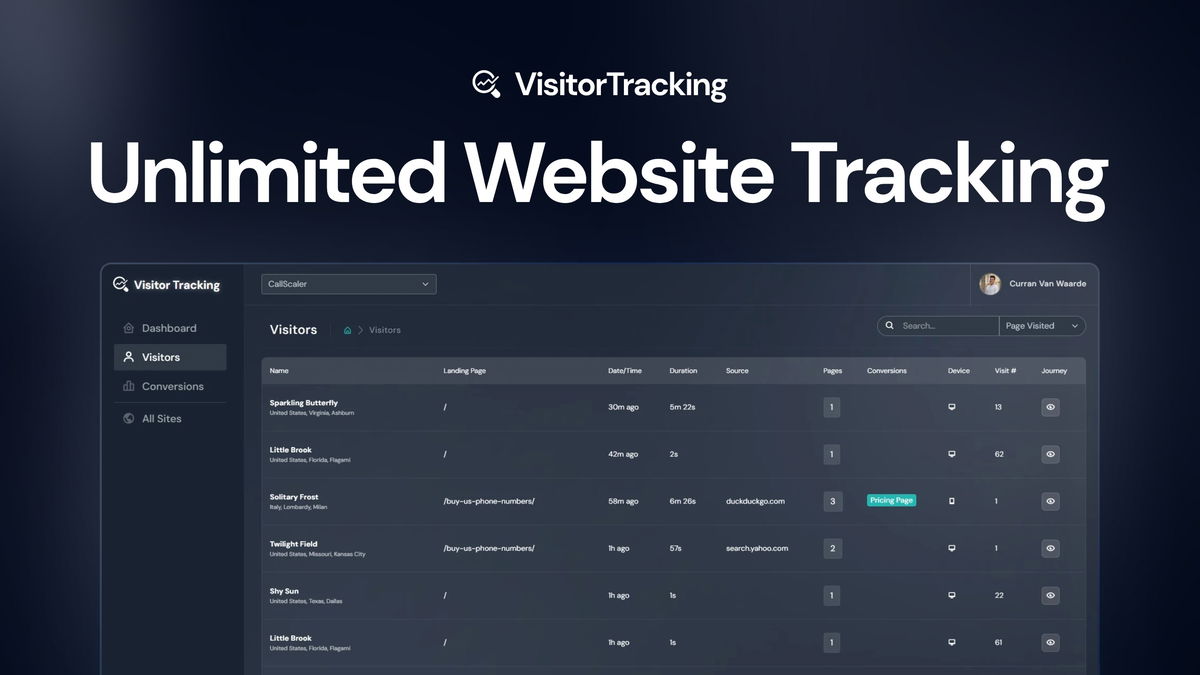
If you manage websites, you need more than pageview totals. You need to know where visitors come from, what they do on each page, and where they leave before they convert. Visitor Tracking helps you watch real-time visitor activity, review funnel performance, and understand customer journeys from one dashboard.
This Visitor Tracking review explains what the tool does, who it fits best, where it may feel limited, and how you can use its reports to improve marketing, product pages, and customer experience.
What Is Visitor Tracking?
Visitor Tracking is a website analytics and behavior-tracking tool. It helps you see who lands on your site, how visitors move between pages, and which actions lead to conversions or drop-offs.
Instead of checking several reports in different tools, you can use one dashboard to follow live sessions, review customer journeys, and compare funnel performance across multiple websites.
Who Should Use Visitor Tracking?
Visitor Tracking fits people who need practical behavior data without building a complex enterprise analytics stack.
- Marketers can check campaign traffic and spot weak landing pages.
- Founders can see where leads, signups, or trials drop off.
- Product teams can review user paths before making UX changes.
- Agencies can monitor multiple client sites from one dashboard.
- Content site owners can see which pages attract and retain visitors.
How Visitor Tracking Works
You add a tracking snippet to your website or install it through a tag manager. After setup, the dashboard starts collecting visitor activity, conversion events, and journey data.
- Add your website: Create the site inside the dashboard.
- Install the tracking code: Place the snippet directly on the site or through a tag manager.
- Define key conversions: Track actions such as signups, purchases, demo requests, or form submissions.
- Review visitor streams: Watch visitor activity and session paths.
- Improve weak points: Use funnel and journey data to fix pages, forms, or campaign flows.
For daily use, you can monitor traffic spikes, follow individual sessions, and validate A/B changes. For deeper analysis, you can review conversion paths and compare how different landing pages perform.
Visitor Tracking Features
Real-Time Visitor Streams
You get a single place to watch who is landing on your sites and how they move through them. Visitor streams help you spot sudden traffic changes, broken flows, and unusual visitor behavior while it happens.
This is useful during product launches, ad campaigns, email promotions, and site updates. For example, if a campaign sends traffic to a checkout page and visitors leave before payment, you can investigate the issue faster.
Funnel and Conversion Tracking
Funnel tracking helps you see where visitors leave before they complete an important action. You can use this to review signups, checkout steps, lead forms, demo requests, or content upgrade flows.
The main value is prioritization. Instead of guessing which page needs work, you can focus on the step with the biggest drop-off.
Customer Journey Insights
Customer journey tracking shows the path visitors take across your site. This helps you understand whether people read the right pages before converting, whether they loop between confusing pages, or whether they leave after seeing pricing or forms.
For a simple example, a visitor may land on a blog post, open a comparison page, check pricing, and then submit a demo request. That path tells you which content supports the conversion.
Multi-Site Tracking
Visitor Tracking can help you monitor several websites from one account. This matters if you run multiple niche sites, SaaS landing pages, client websites, or campaign microsites.
The article should not treat “unlimited sites” as “unlimited traffic.” Plan limits may still apply to pageviews, users, or other usage caps. Always check the current plan details before you buy.
What People Say
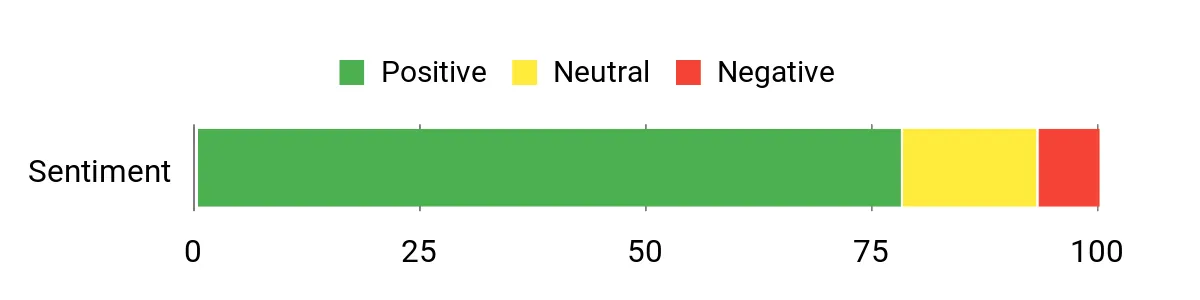
Customers often mention that the live streams and funnel reports make it easier to find issues without digging through several tools. The most common positive themes are simple setup, real-time visibility, and clear journey insights.
Some users also mention limits around deeper reporting, export options, or advanced segmentation. That means Visitor Tracking may work well for practical website behavior analysis, but larger teams may still need a more advanced analytics suite for complex attribution and reporting.
Overall Sentiment: Positive
🗣️ Marketing Lead
The live visitor stream made it easy to spot unexpected activity on our site and follow sessions in real time, which helped us identify a broken checkout step during a campaign and fix it faster. The unified dashboard meant I didn’t have to jump between tools to see the full picture.
🗣️ Product Manager
Funnel reports and journey visualization were the most useful parts for our team. We traced where signups dropped off and adjusted the form flow, and the change became visible in the dashboard within hours. Setup was intuitive and adding multiple sites was painless.
Visitor Tracking Pros and Cons
| Pros | Cons |
|---|---|
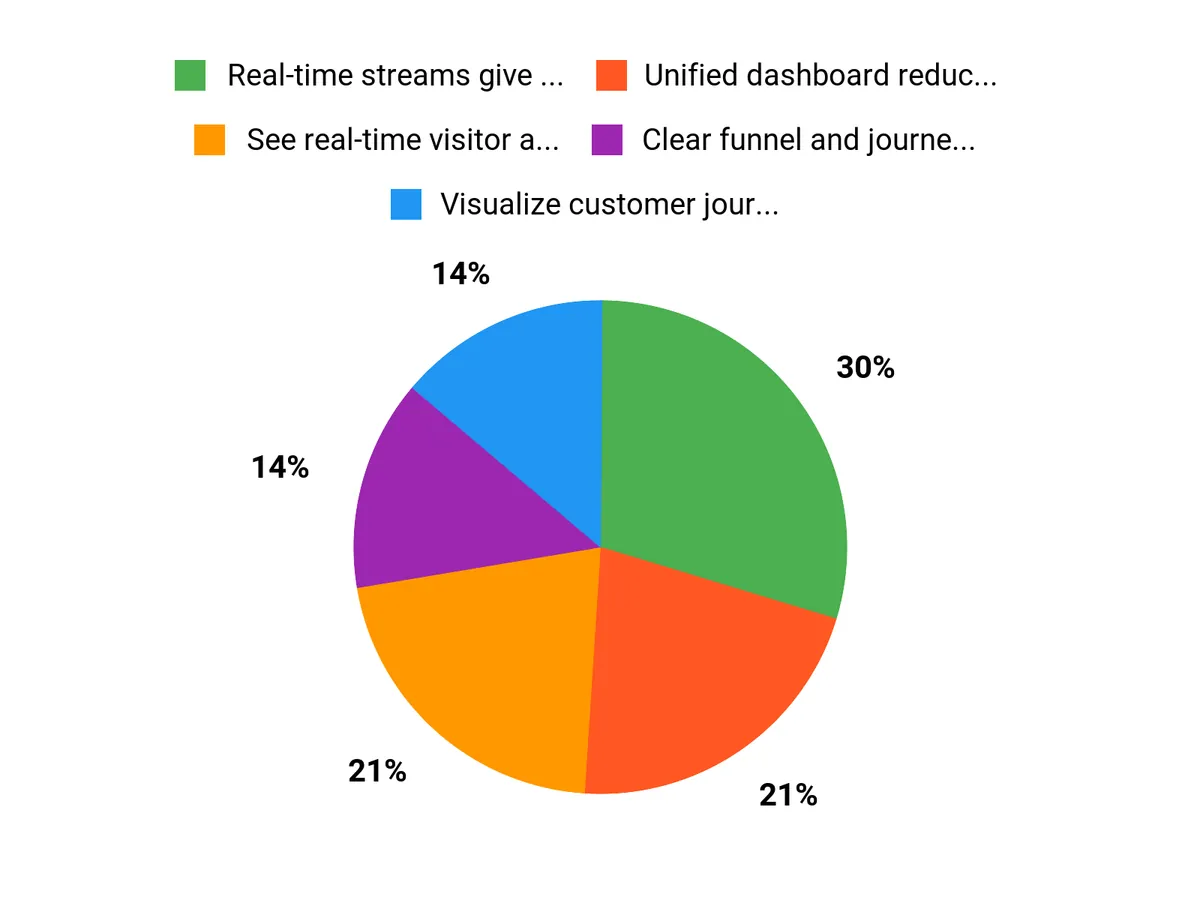
| ✅ Real-time streams give immediate visibility into visitor behavior | ❌ Advanced segmentation options can feel limited compared with enterprise analytics |
| ✅ Unified dashboard reduces context switching between tools | ❌ Some teams may want deeper attribution features out of the box |
| ✅ Clear funnel and journey views speed up optimization efforts | ❌ Plan limits may apply to pageviews, users, or advanced reporting features |
| ✅ Easy to add and manage multiple sites | ❌ Privacy settings need careful review before tracking sensitive user actions |
Long-Term Cost Benefits
Visitor Tracking can help you spend less time guessing which changes matter. When you see where visitors hesitate, repeat steps, or leave, you can prioritize fixes with clearer evidence.
For example, a small team may use funnel data to find a weak form step before spending money on a full redesign. That can lower wasted development time and make website testing more focused.
Return on Investment
You may see faster wins when you use Visitor Tracking to fix specific funnel problems. Better forms, clearer landing pages, and smoother checkout paths can improve conversion efficiency.
Do not treat ROI as guaranteed. The result depends on your traffic volume, offer quality, tracking setup, and how quickly you act on the data.
Usability
| Aspect | Ease Level | Notes |
|---|---|---|
| Setup | Easy | Basic installation and site onboarding are straightforward with clear instructions. |
| Dashboard Navigation | Easy | Metrics and streams are laid out so you can find what you need quickly. |
| Funnel Setup | Moderate | Simple funnels are easy to build, but complex conversions may require extra testing. |
| Multi-site Management | Easy | Managing several sites from one account is simple and well organized. |
Performance and Speed
Visitor Tracking is designed to show visitor activity with minimal delay. That helps when you need to watch a launch, check campaign traffic, or review a recent website change.
You should still test the tracking script on your own site. Any third-party script can affect performance if it loads poorly, conflicts with other scripts, or runs on pages that already have heavy assets.
Integrations
Visitor Tracking can fit into a wider marketing and analytics stack when you connect it with tools such as analytics platforms, tag managers, automation tools, and CRMs.
| Software | Integration Quality |
|---|---|
| Google Analytics | Good |
| Zapier | Moderate |
| Tag Managers (e.g., GTM) | Good |
| CRMs (via webhook) | Moderate |
Before you rely on any integration, confirm that the current plan supports it. Integration access can vary by plan, usage tier, or product update.
Security and Privacy
Visitor tracking tools can collect sensitive behavior data, so privacy settings matter. Before you publish tracking on a live site, review what the tool records, how long data stays available, and whether sensitive fields can be masked or excluded.
| Feature | Protection Level |
|---|---|
| Data Encryption In Transit | High |
| Session Anonymization Options | Moderate |
| Role-Based Access Controls | High |
Use anonymization, field masking, cookie consent, and data retention controls where required by your privacy obligations. Do not record passwords, payment details, health information, or other sensitive form entries.
Reporting and Analytics
Reporting combines funnels, journey maps, and live streams into shareable views. This helps you explain findings to stakeholders without exporting large amounts of raw data.
The best use case is practical optimization. Use reports to answer questions such as “Which landing page leaks leads?” or “Which step stops trial users from finishing signup?”
Support
Support appears focused on setup, troubleshooting, and onboarding. Documentation can help with common use cases, but you should review the latest support terms before purchase because response times and support channels may change.
Key Benefits
- See real-time visitor activity so you can react quickly
- Visualize customer journeys to find drop-off points
- Track funnels and conversions for focused optimization
- Monitor multiple sites from one dashboard
- Use behavior data to prioritize website fixes
- Share clearer reports with clients, teams, or stakeholders
Visitor Tracking vs Traditional Analytics Tools
| Comparison Point | Visitor Tracking | Traditional Analytics |
|---|---|---|
| Main focus | Visitor behavior, journeys, funnels, and real-time streams | Traffic reports, events, channels, and audience metrics |
| Best for | Finding friction points and reviewing user paths | Measuring broad performance and acquisition trends |
| Ease of use | Simple for small teams and site owners | Can require more setup and analysis skill |
| Limitations | May lack advanced attribution or enterprise reporting depth | May not show individual journey context clearly |
FAQ
What is Visitor Tracking used for?
Visitor Tracking is used to monitor website visitor behavior, review conversion paths, and find drop-off points. It helps you understand what visitors do before they convert, leave, or get stuck on your site.
How does real-time tracking work?
You see visitors as they interact with your site through real-time visitor streams and session playback. These reports help you spot traffic spikes, campaign issues, or broken flows faster than delayed analytics reports.
Is Visitor Tracking good for small businesses?
Yes, Visitor Tracking can fit small businesses that need simple behavior insights without a complex analytics setup. It is useful if you want to improve landing pages, lead forms, checkout paths, or campaign performance.
Does Visitor Tracking replace Google Analytics?
Visitor Tracking may not fully replace Google Analytics for every team. Use it as a behavior and journey analysis tool, while keeping a broader analytics platform if you need deep channel reporting, attribution modeling, or long-term traffic analysis.
Can Visitor Tracking monitor multiple websites?
Yes, Visitor Tracking is positioned for monitoring multiple websites from one dashboard. Always check the current plan limits before purchase because pageview caps, user seats, and advanced features can vary by plan.
Is visitor data secure and private?
You can expect common protections such as encryption in transit, role-based access controls, and anonymization options. Still, you should review privacy settings, exclude sensitive fields, and follow consent rules that apply to your visitors.
How easy is setup and integration?
Setup is straightforward for most websites. You add a tracking snippet or use a tag manager, then connect your site inside the dashboard. Start with one simple funnel before you build more complex conversion tracking.
Who should avoid Visitor Tracking?
Visitor Tracking may not be ideal if you need enterprise-grade attribution, advanced segmentation, complex data warehousing, or strict internal compliance workflows. Larger teams should compare privacy controls, reporting depth, and integration limits before buying.
Why Choose Visitor Tracking
You’ll choose Visitor Tracking if you want real-time website behavior data in a clear dashboard. It brings visitor streams, funnel tracking, conversion tracking, and customer journey insights together so you can find friction and act faster.
It is especially useful if you manage multiple sites, test landing pages often, or need quick feedback after campaigns and site changes.
Final Verdict: Is Visitor Tracking Worth It?
Visitor Tracking is worth considering if you want a straightforward way to understand who visits your websites and what they do before converting or leaving. Its strongest value comes from live visitor streams, funnel analysis, and journey visualization.
You will get the most value if you define your key conversions before setup, review reports regularly, and turn behavior insights into specific site improvements. Check the current plan details, privacy controls, and usage limits before you buy.